Get Started
Follow the guide below to start making explainable recommendations with Recsplain.
Start with:
Then start searching by:
Note
Learn more about the methods in the Reference 🦖.
Installation
Import the package using the following import statement.
import recsplain as rx
Note
Learn more about the method in the Installation reference.
Configuration
First, you need to do is to configure the user recommendation strategy by using:
rec_strategy = rx.AvgUserStrategy()
Note
More strategies to come.
Use the init_schema method to configure the system so that it knows how to partition and compare feature vectors.
Here is an example of how to call the init_schema method.
import recsplain as rx

config_data = {
  "filters": [{ "field": "country", "values": ["US", "EU"] }],
  "encoders": [
    {
      "field": "price",
      "values": ["low", "mid", "high"],
      "type": "onehot",
      "weight": 1
    },
    {
      "field": "category",
      "values": ["dairy", "meat"],
      "type": "onehot",
      "weight": 2
    }
  ],
  "metric": "l2"
}

rx.init_schema(config_data)
Weights are used to set the relative importance the system should attribute to this feature in the similarity check.
This is the response from init_schema.
{
  "status": "OK",
  "partitions": 2,
  "vector_size": 7,
  "feature_sizes": {
    "price": 4,
    "category": 3
  },
  "total_items": 0
}
Note
Encoder type one-hot save one spot for unknown feature_sizes so the size is N + 1.
Note
Learn more about the method in the configuration reference.
Index
Use the index method to add items to the Recsplain system so that it has items to partition and compare.
Here is an example of how to call the index method.
import recsplain as rx

index_data = [
  {
    "id": "1",
    "price": "low",
    "category": "meat",
    "country": "US"
  },
  {
    "id": "2",
    "price": "mid",
    "category": "meat",
    "country": "US"
  },
  {
    "id": "3",
    "price": "low",
    "category": "dairy",
    "country": "US"
  },
  {
    "id": "4",
    "price": "high",
    "category": "meat",
    "country": "EU"
  }
]


rx.index(index_data)
This is the response from index.
{
  "status": "OK",
  "affected_partitions": 2
}
Note
If you do not index items, when you search there will be nothing to check the search against for similarity.
Note
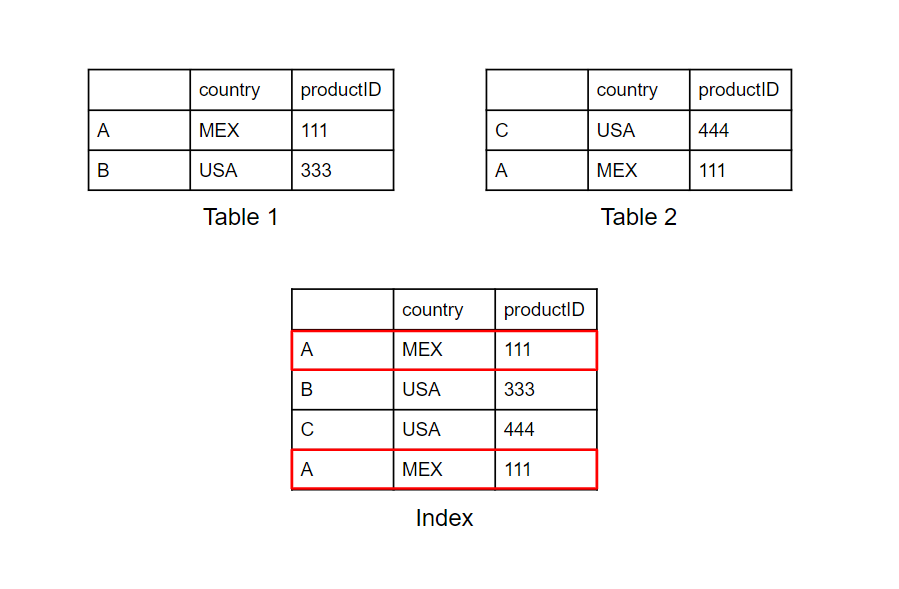
When reusing the index method, using the same id twice creates duplicate entries in the index. In the example below the index method is called twice with the same entry. In the index table both entries are created.
Note
Learn more about the method in the index reference.
Item Similarity
Use the query method to search by item.
The method returns explainable recommendations for indexed items that are similar to the search item.
Here is an example of how to call the query method.
import recsplain as rx

item_query_data = {
  "k": 2,
  "data": {
    "price": "low",
    "category": "meat",
    "country": "US"
  },
  "explain": 1
}

rx.query(item_query_data)
This is the response from query.
{
  "status": "OK",
  "ids": ["A", "B"],
  "distances": [1, 3],
  "explanation": [
    {
      "price": 2,
      "category": 0
    },
    {
      "price": 0,
      "category": 8
    }
  ]
}
Note
Learn more about the method in the item similarity reference.
User Preference
Use the user_query method to search by user.
The method returns explainable recommendations for indexed items that the user likely prefers.
Here is an example of how to call the user_query method.
import recsplain as rx

user_query_data = {
  "k": 2,
  "item_history": ["1", "3", "3"],
  "data": {
    "country": "US"
  },
  "explain": 1
}

rx.user_query(user_query_data)
This is the response from user_query.
{
  "status": "OK",
  "ids": ["A", "B"],
  "distances": [0.888898987902, 3.555675839384],
  "explanation": [
    {
      "price": 0.226394039574,
      "category": 2.345345345345
    },
    {
      "price": 0.982357384756,
      "category": 8.234231020394
    }
  ]
}
Note
Learn more about the method in the user preference reference.